Adventurer
A balanced traveler, capable with steel and spells.
 ULARN 3DTHE CAVES BELOW
Field guide
A classic turn-based roguelike in an overhead 3D world. Prepare in town, explore the caves, and make every move count.
01 / Begin in town
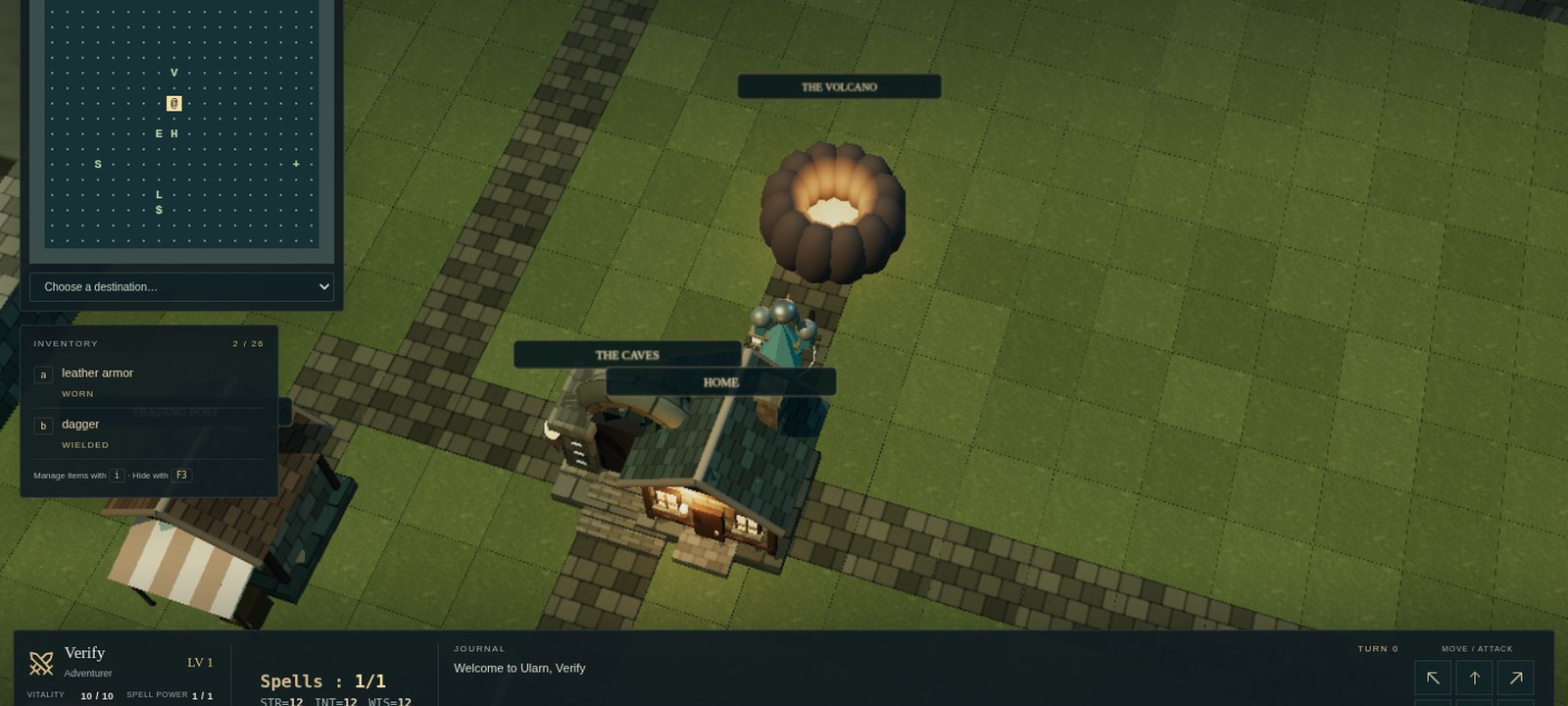
Choose a name, class, and difficulty on the Ularn play page. The Adventurer is a balanced place to start. Town gives you room to find your bearings: stores, a bank, and a college offer ways to prepare before entering the caves.
Stand on a building or entrance and use its contextual action. Beneath town lie fifteen dungeon floors; the volcano adds five more. Your map reveals explored territory and uses the original game symbols. Monsters move and fight as you spend turns. You can stop to think without letting them take another turn.
Move into a monster to attack with your equipped weapon. Learn spells, manage your inventory, and watch the effects shown on the right side of the screen. Stronger enemies make preparation as useful as a good weapon.
02 / Choose your calling
Each class starts with its own attributes and equipment.
A balanced traveler, capable with steel and spells.
A brilliant spellcaster with powerful magic and fragile defenses.
Nimble and clever, with dexterity as a particular strength.
A versatile spellcaster with a light touch in combat.
Sturdy and strong, built to endure the depths.
Exceptional strength, with little aptitude for magic.
A formidable fighter: strong and fierce, with limited wisdom.
Weak starting attributes, paired with an extraordinary Lance of Death.
03 / Every step matters
The on-screen action bar and direction pad work alongside the keyboard. Camera rotation keeps the compass directions unchanged.
| Action | Control |
|---|---|
| Move or attack | Arrow keys or the on-screen direction pad |
| Travel to an explored tile | Click the world or symbol map; travel stops near danger |
| Wait one turn | . |
| Enter a building or landmark | Contextual action or E |
| Go down / go up | > / < |
| Open a door or chest | o, then follow the prompt |
| Open inventory | i |
| Wield a weapon / wear armor | w / W |
| Drink / read / drop an item | q / r / d |
| Cast a spell | c, then its three-letter code and a direction if requested |
| Toggle auto-loot | F2 or the Auto-loot button (gold is always collected) |
| Show or hide pinned inventory | F3 or the Pin inventory button |
| Cancel a prompt | Esc |
| Original command reference | ? |
04 / Spells and saving
Known spells appear in the game’s spell reference. Casting spends spell power, and some spells ask for a direction before they take effect. Watch the casting animation and visible trail to follow a projectile through the dungeon. Active buffs and conditions appear beside the play area.
The game saves automatically between actions. Use Save for a manual checkpoint, or Save & return to title from the menu. Return to the same browser and site, then choose Continue expedition. Browser saves live in that browser’s site storage. Desktop saves stay in your Windows profile and are separate from browser saves. Death ends the current run. There is no account or cloud sync.
05 / Windows edition
The browser game is ready without a download. If you prefer a separate window, the Windows edition bundles the same adventure for offline play.
Download and run Ularn-1.3.17.windows.exe (latest release v1.3.17). This portable build needs no installation and targets 64-bit Windows 10 or later. It is unsigned, so Windows may identify it as an unrecognized publisher. Desktop saves are separate from browser saves.
Optional download. Play online anytime.
Settle in
Use the camera buttons to rotate, center, and zoom. Balanced graphics limits rendering work and stops drawing idle gameplay scenes; background tabs suspend rendering. Cinematic graphics adds bloom. Sound starts muted, and the game respects your device’s reduced-motion preference.
History & creators
This section honors the creators and maintainers of Larn and Ultra-Larn. Dates and roles follow public histories such as larn.org’s History of Larn and Ularn by Derek Newhall, RogueBasin, and the Ularn SourceForge project notes.
Larn
Noah Morgan created Larn for Unix and shared it for others to enjoy. The adventure asks you to find a cure for your ailing daughter before time runs out — exploring a persistent town, a multi-level dungeon, and volcanic depths beneath.
Morgan’s last major authored line is commonly cited as Larn 11.0; Larn 12.0 (August 1986) is associated with Morgan and James D. McNamara, who handled distribution and patching. Morgan’s terms allowed free use and modification so long as the work was not sold for profit.
Ports and follow-ons kept Larn alive on other systems, including Don Kneller’s MS-DOS port and later DOS work by Kevin Routley. Variants and rewrites continue; Morgan’s original also remains part of the NetBSD games collection.
Ultra-Larn
Phil Cordier created Ultra-Larn — usually shortened to Ularn — while at UC Santa Cruz. The copyright date is 1987; the first wide Usenet posting is often dated 1989. Ularn grew from Larn 12.0 and introduced true character classes, additional dungeon and volcano levels, more demon lords, new artifacts, and other expansions that define the Ularn flavor many players know.
Cordier continued the line through Ularn 2.0 (“The Addiction of Ularn”) into the 1990s. Later packaging and maintenance included David Richerby (Ularn 1.5.1), Josh Brandt (1.5.2–1.5.4), and Josh Bressers (maintainer from 2005). Julian Olds produced a Windows-oriented rewrite often called Ultra Larn 1.6. Scott S. Snyder’s MS-DOS patch is among the early Ularn ports.
We thank Cordier and everyone who shepherded Ultra-Larn. This 3D project is a respectful presentation of that tradition, not a claim of authorship over their work.
Timeline
Noah Morgan releases Larn on Unix; Larn 12.0 becomes the root of later branches.
Don Kneller, Kevin Routley, and others bring Larn to DOS and other platforms.
Phil Cordier expands Larn into Ularn with classes, deeper levels, and new content.
David Richerby, Josh Brandt, Josh Bressers, and others keep Ularn building and playable.
Rules and adventure powered by Jason Primeau’s JavaScript Larn / Ularn engine, presented in an overhead Three.js world with browser play and an optional Windows build.
This edition
Gameplay rules come from the Ularn / Larn JavaScript engine by Jason Primeau ((engine license)). The 3D presentation, interface, and packaging around that engine are original to this project.
For deeper lineage notes, see The History of Larn and Ularn, RogueBasin’s Ularn page, and the Ularn SourceForge site.